DarkQ
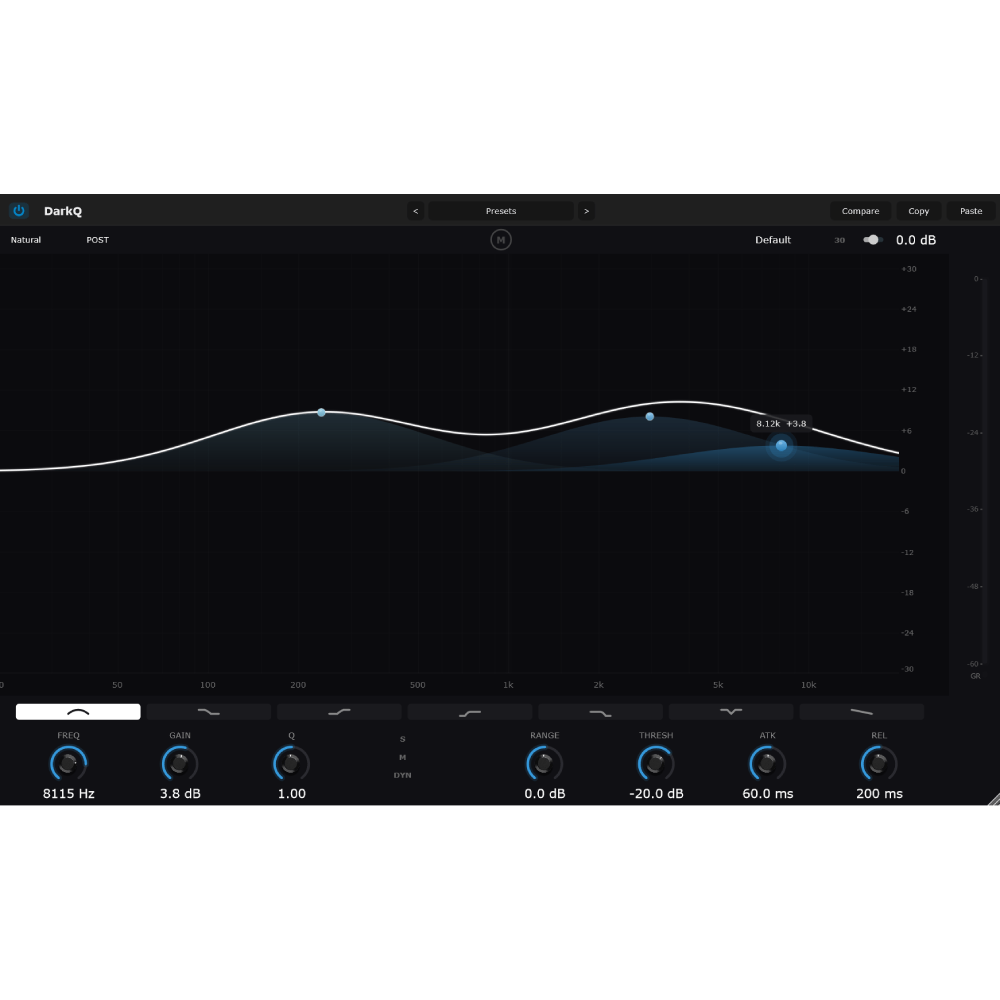
A clean, modern parametric EQ with a real-time spectrum analyzer and dynamic EQ — the everyday workhorse equalizer. DarkQ gives you up to 24 bands placed and edited directly on an interactive curve display, each capable of static or dynamic EQ, with a transparent signal path and the core tools you need without the extra weight.
Working surface
CURVE DISPLAY + ANALYZER — The main interactive screen. Drag bands directly on the curve to set frequency and gain; the real-time spectrum analyzer shows the signal. Add, edit, and remove bands on this display.
SPECTRUM MODE (PRE / POST / P+P) — Show the input spectrum, output spectrum, or both overlaid.
Per-band controls (selected band)
FREQ — Band center/corner frequency.
GAIN — Band gain/cut.
Q — Bandwidth/resonance.
TYPE (Bell / Low Shelf / High Shelf / Low Cut / High Cut / Notch / Tilt Shelf) — Band shape.
SLOPE (6 / 12 / 24 / 48 / 96 dB/oct) — Filter steepness for cuts and shelves.
SOLO — Audition just the selected band.
BYPASS (per band) — Disable an individual band.
Dynamic EQ
DYN — Turns the selected band into a dynamic EQ band that acts only when the signal crosses a threshold:
- RANGE (−30…+30 dB) — Max dynamic gain change.
- THRESH (−60…0 dB) — Where the dynamic action kicks in.
- ATTACK / RELEASE — Dynamic timing.
Quality
PHASE MODE (Zero Latency / Natural) — Zero-Lat is minimum-latency, Natural is analog-matched phase response.
Workflow
GAIN SCALE — Toggles the display range (6 / 12 / 30 dB) and scales the magnitude of your moves.
PRESET
Global
OUTPUT (−24…+24 dB) — Output gain.
BYPASS — Global bypass.
zhalgas.uzh55 –
Very convenient, fast and visual. I need to dial up the entire Dark chain. The prices are low, and the quality of the plugins and ease of processing vocals are top notch. Respect to the developers
thanhkt.dangquang@gmail.com –
Good