DarkQPro
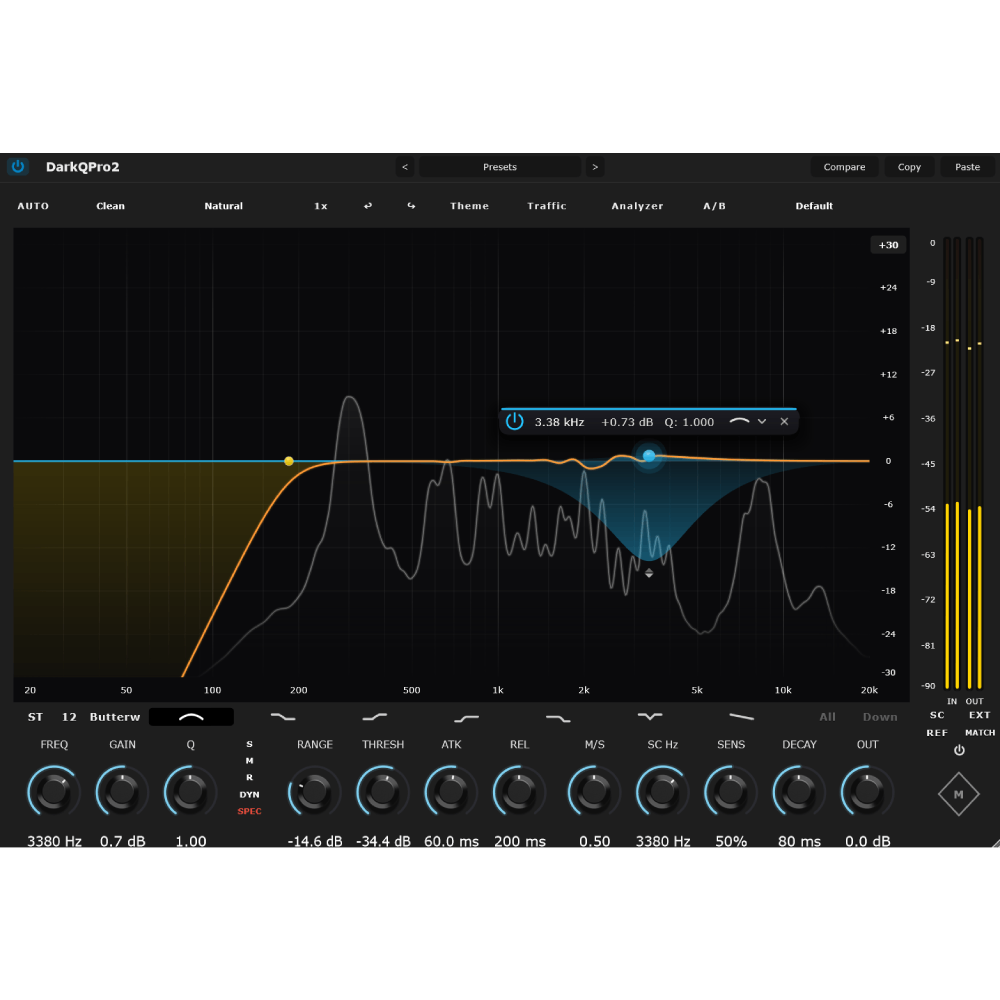
A clean, surgical-and-musical parametric EQ with a full spectrum analyzer, dynamic and spectral processing, mid/side capability, and a complete pro workflow (A/B, undo/redo, EQ match). DarkQPro gives you up to 24 fully configurable bands placed and edited directly on an interactive curve display, each capable of static EQ, dynamic EQ, or per-frequency spectral dynamics.
Working surface
CURVE DISPLAY + ANALYZER — The main interactive screen. Drag bands directly on the curve to set frequency and gain; the real-time spectrum analyzer shows input/output. You add/edit/remove bands on this display.
ANALYZER controls — Spectrum mode, view, tilt, speed, peak-hold, and freeze for the display.
Per-band controls (selected band)
FREQ (20 Hz…20 kHz) — Band center/corner frequency.
GAIN (−30…+30 dB) — Band gain/cut.
Q (0.1…30) — Bandwidth/resonance.
TYPE (Bell / Low Shelf / High Shelf / Low Cut / High Cut / Notch / Tilt Shelf) — Band shape.
SLOPE (6 / 12 / 24 / 48 / 96 dB/oct) — Filter steepness for cuts and shelves.
CURVE TYPE (Digital / Butterworth / Linkwitz-Riley) — The filter curve math used for cuts/shelves.
SOLO — Audition just the selected band.
BYPASS (per band) — Disable an individual band.
STEREO MODE (Stereo / Left / Right / Mid / Side) — Each band can act on the full stereo image or just L, R, M, or S — full mid/side EQ.
Dynamic + spectral processing
DYN (dynamic EQ) — Turns the selected band into a dynamic EQ band that acts only when the signal crosses a threshold, with:
- RANGE (−30…+30 dB) — Max dynamic gain change.
- THRESH (−80…0 dB) — Where the dynamic action kicks in.
- ATTACK (0.1…500 ms) / RELEASE (10…2000 ms) — Dynamic timing.
COMP MODE (Downward / Upward / Both) — Direction of the dynamic action.
SPEC (spectral dynamics) — Per-frequency dynamic processing across the band (each frequency moves independently), for transparent resonance/harshness control.
SC Hz (sidechain frequency) — Tunes the band’s detector.
EXT SC — Use an external sidechain input to drive the dynamics.
M/S BALANCE — Mid/side balance for the band’s processing.
EQ character / quality
EQ MODE (Clean / Medium / Analog) — Overall voicing, from fully transparent to subtly analog-flavored.
PHASE MODE (Zero Latency / Natural) — Zero-Lat is minimum-latency, Natural is analog-matched phase response.
OVERSAMPLING — Higher quality / more CPU for the filtering.
Workflow
A/B — Compare two full settings snapshots.
UNDO / REDO — Step through edit history.
CAPTURE + MATCH — Capture a reference spectrum and apply EQ Match to shape your source toward it.
AUTO GAIN — Automatic output compensation so EQ changes don’t shift level.
GAIN SCALE — Scales the magnitude of all your moves at once.
PRESET / SAVE — Preset management.
FREEZE — Freeze the spectrum display.
Global
OUTPUT (−24…+24 dB) — Output gain, plus separate MID and SIDE output trims for M/S balance.
BYPASS / BYPASS ALL — Global bypass.
THEME — UI color theme.
Alex Morgan –
Clean sound, fast, and easy to use
Magic Studios –
Amazing eq!
Ahmed –
Darkqpro has become my go to eq
Dragonwire Audio –
Resonable price, easy to use, and powerful. A great choice for your general EQ needs.